
Microsoft 365の不要なグループを一括で削除済のグループに移動するスクリプトを紹介します。
元々はテナント移行を実施する中で、移行先で使用しないチームをまとめて削除するために作成したスクリプトですが、運用でも活用可能と判断し、展開を検討しました。
本記事では、詳細なスクリプトや準備から実行までの一連の流れを紹介します。
また、準備にあたりグループのID(以下、GroupID)を控える必要があります。
以下の記事で一覧取得するスクリプトも紹介しておりますので、併せてご覧ください。
インプット用ファイルの作成
以下の内容をまとめ、Excelファイルに起票します。
GroupID:削除するグループのID
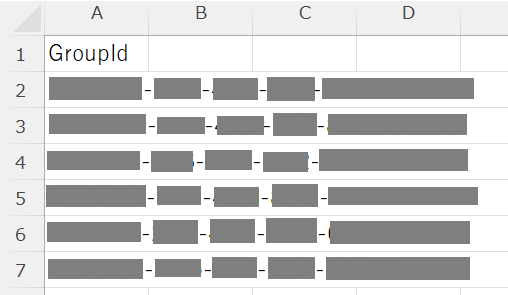
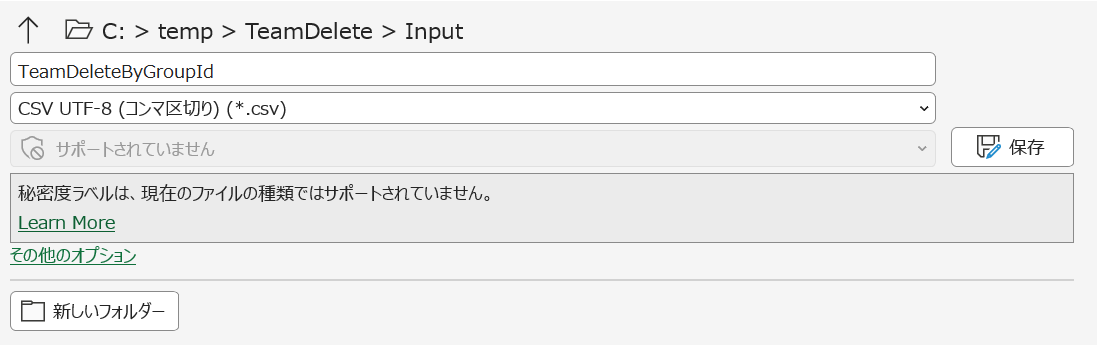
起票したファイルはCSVファイルとして保存します。
スクリプトの作成から実行まで
スクリプトの作成
以下の内容でスクリプトをメモ帳等に貼り付け、ps1ファイルとして保存します。
日本語等の全角文字を含むため、エンコードは「UTF-8(BOM付き)」で保存してください。
-
スクリプト内の「$InputDir」とインプットするCSVファイルの配置先は同じにしてください。
-
実際にインプットするパスやファイル名を合わせてスクリプトの赤文字部分を更新してください。
# =========================
# パス・ファイル名指定
# =========================
$BasePath  = 'C:\temp\TeamDelete'
$InputDir  = Join-Path $BasePath 'Input'
$OutputDir = Join-Path $BasePath 'Output'
$LogDir    = Join-Path $BasePath 'Logs'

$InputCsv   = Join-Path $InputDir  'TeamDeleteByGroupId.csv'
$OutputCsv  = Join-Path $OutputDir 'TeamDelete_Result.csv'
$LogFile    = Join-Path $LogDir    'TeamDelete.log'

$GroupIdColumnName = 'GroupId'

# 非Teamグループも削除したい場合は $true 必須
$DeleteNonTeamGroups = $true

function Ensure-Directory {
    param([Parameter(Mandatory=$true)][string]$Path)
    if (-not (Test-Path $Path)) {
        New-Item -Path $Path -ItemType Directory -Force | Out-Null
    }
}

function Write-Log {
    param(
        [Parameter(Mandatory=$true)][string]$Message,
        [ValidateSet('INFO','WARN','ERROR')][string]$Level = 'INFO'
    )
    $ts = (Get-Date).ToString('yyyy-MM-dd HH:mm:ss')
    $line = "[$ts][$Level] $Message"
    Write-Host $line
    Add-Content -Path $LogFile -Value $line -Encoding UTF8
}

function Is-Guid {
    param([Parameter(Mandatory=$true)][string]$Value)
    $tmp = [guid]::Empty
    return [guid]::TryParse($Value, [ref]$tmp)
}

# =========================
# 各ディレクトリの準備
# =========================
Ensure-Directory -Path $InputDir
Ensure-Directory -Path $OutputDir
Ensure-Directory -Path $LogDir

"==== Start: $(Get-Date) ====" | Out-File -FilePath $LogFile -Encoding UTF8

if (-not (Test-Path $InputCsv)) {
    Write-Log -Message "入力CSVが見つかりません: $InputCsv" -Level 'ERROR'
    Write-Log -Message "例) 1列 'GroupId' のみで GUID を並べてください。" -Level 'ERROR'
    throw 'Input CSV not found.'
}

# =========================
# モジュールインポート
# =========================
$RequiredModules = @('Microsoft.Graph.Groups')

foreach ($m in $RequiredModules) {
    if (-not (Get-Module -ListAvailable -Name $m)) {
        Write-Log -Message "モジュール '$m' が未インストールです。インストールします(CurrentUser)..." -Level 'WARN'
        try {
            Install-Module $m -Scope CurrentUser -Force -AllowClobber -ErrorAction Stop
            Write-Log -Message "モジュール '$m' をインストールしました。" -Level 'INFO'
        }
        catch {
            Write-Log -Message "モジュールのインストールに失敗: $($_.Exception.Message)" -Level 'ERROR'
            throw
        }
    }

    try {
        Import-Module $m -ErrorAction Stop
    }
    catch {
        Write-Log -Message "モジュール Import に失敗: $m / $($_.Exception.Message)" -Level 'ERROR'
        throw
    }
}

# =========================
# Graphサインイン
# =========================
$Scopes = @('Group.ReadWrite.All')

Write-Log -Message 'Microsoft Graph にサインインします(対話認証)...' -Level 'INFO'
try {
    $ctx = Get-MgContext -ErrorAction SilentlyContinue
    if (-not $ctx -or -not $ctx.Account) {
        Connect-MgGraph -Scopes $Scopes -ErrorAction Stop | Out-Null
    }
    else {
        Write-Log -Message "既にサインイン済み: $($ctx.Account)" -Level 'INFO'
    }

    $ctx2 = Get-MgContext
    Write-Log -Message "サインイン完了: Account=$($ctx2.Account) TenantId=$($ctx2.TenantId)" -Level 'INFO'
}
catch {
    Write-Log -Message "サインイン失敗: $($_.Exception.Message)" -Level 'ERROR'
    throw
}

# =========================
# CSV読み込み
# =========================
try {
    $rows = Import-Csv -Path $InputCsv -Encoding UTF8
}
catch {
    Write-Log -Message "CSV 読み込み失敗: $($_.Exception.Message)" -Level 'ERROR'
    throw
}

if (-not $rows -or $rows.Count -eq 0) {
    Write-Log -Message '入力CSVにデータがありません。' -Level 'ERROR'
    throw 'No input data.'
}

if (-not ($rows[0].PSObject.Properties.Name -contains $GroupIdColumnName)) {
    $cols = $rows[0].PSObject.Properties.Name -join ', '
    Write-Log -Message "入力CSVに列 '$GroupIdColumnName' がありません。実際の列: $cols" -Level 'ERROR'
    throw 'GroupId column not found.'
}

# =========================
# 削除済のグループに移動
# =========================
$result = New-Object System.Collections.Generic.List[object]

foreach ($r in $rows) {
    $groupId = ($r.$GroupIdColumnName).ToString().Trim()
    if ([string]::IsNullOrWhiteSpace($groupId)) { continue }

    if (-not (Is-Guid -Value $groupId)) {
        Write-Log -Message "GUID形式ではないためスキップ: $groupId" -Level 'WARN'
        $result.Add([pscustomobject]@{
            GroupId     = $groupId
            DisplayName = $null
            Mail        = $null
            IsTeam      = $null
            Action      = 'Skip'
            Success     = $false
            Message     = 'Invalid GUID format'
            ProcessedAt = (Get-Date).ToString('yyyy-MM-dd HH:mm:ss')
        })
        continue
    }

    Write-Log -Message "処理開始: GroupId=$groupId" -Level 'INFO'

    try {
        # 存在確認 + Team判定
        $g = Get-MgGroup -GroupId $groupId -Property 'id,displayName,mail,resourceProvisioningOptions' -ErrorAction Stop

        $isTeam = $false
        if ($g.resourceProvisioningOptions) {
            $isTeam = ($g.resourceProvisioningOptions -contains 'Team')
        }

        # 非Teamをスキップ($DeleteNonTeamGroups=Falseの場合)
        if (-not $isTeam -and -not $DeleteNonTeamGroups) {
            Write-Log -Message "非Teamグループのためスキップ: $groupId / $($g.DisplayName)" -Level 'WARN'
            $result.Add([pscustomobject]@{
                GroupId     = $groupId
                DisplayName = $g.DisplayName
                Mail        = $g.Mail
                IsTeam      = $false
                Action      = 'Skip'
                Success     = $true
                Message     = 'Not a Team-enabled group (skipped by policy)'
                ProcessedAt = (Get-Date).ToString('yyyy-MM-dd HH:mm:ss')
            })
            continue
        }

        # 削除済グループに移動
        Remove-MgGroup -GroupId $groupId -ErrorAction Stop

        Write-Log -Message "削除(ソフト削除)成功: $groupId / $($g.DisplayName) / IsTeam=$isTeam" -Level 'INFO'
        $result.Add([pscustomobject]@{
            GroupId     = $groupId
            DisplayName = $g.DisplayName
            Mail        = $g.Mail
            IsTeam      = $isTeam
            Action      = 'SoftDelete'
            Success     = $true
            Message     = 'Moved to Deleted groups (soft-deleted)'
            ProcessedAt = (Get-Date).ToString('yyyy-MM-dd HH:mm:ss')
        })
    }
    catch {
        Write-Log -Message "失敗: $groupId / $($_.Exception.Message)" -Level 'ERROR'
        $result.Add([pscustomobject]@{
            GroupId     = $groupId
            DisplayName = $null
            Mail        = $null
            IsTeam      = $null
            Action      = 'SoftDelete'
            Success     = $false
            Message     = $_.Exception.Message
            ProcessedAt = (Get-Date).ToString('yyyy-MM-dd HH:mm:ss')
        })
        continue
    }
}

# =========================
# データエクスポート
# =========================
try {
    $result | Export-Csv -Path $OutputCsv -NoTypeInformation -Encoding UTF8
    Write-Log -Message "結果出力: $OutputCsv" -Level 'INFO'
}
catch {
    Write-Log -Message "出力失敗: $($_.Exception.Message)" -Level 'ERROR'
    throw
}

Write-Log -Message "==== End: $(Get-Date) ====" -Level 'INFO'
スクリプトの実行
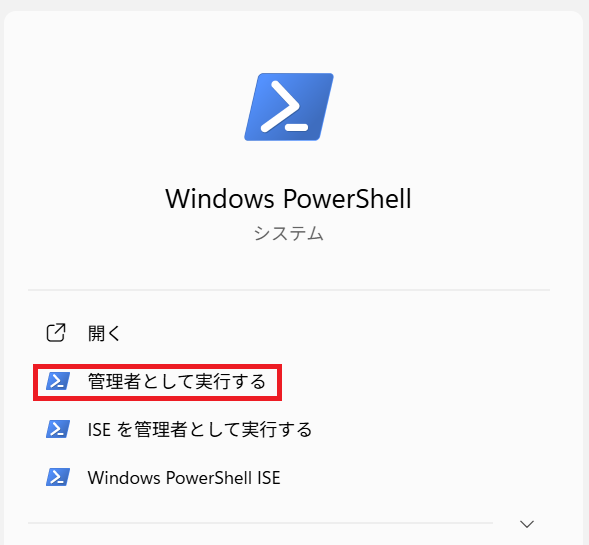
Microsoft.Graph.Groupsがインストールされている端末でPowerShellを管理者として実行します。
Microsoft 365管理者のアカウントを準備し、保存したスクリプトを実行します。
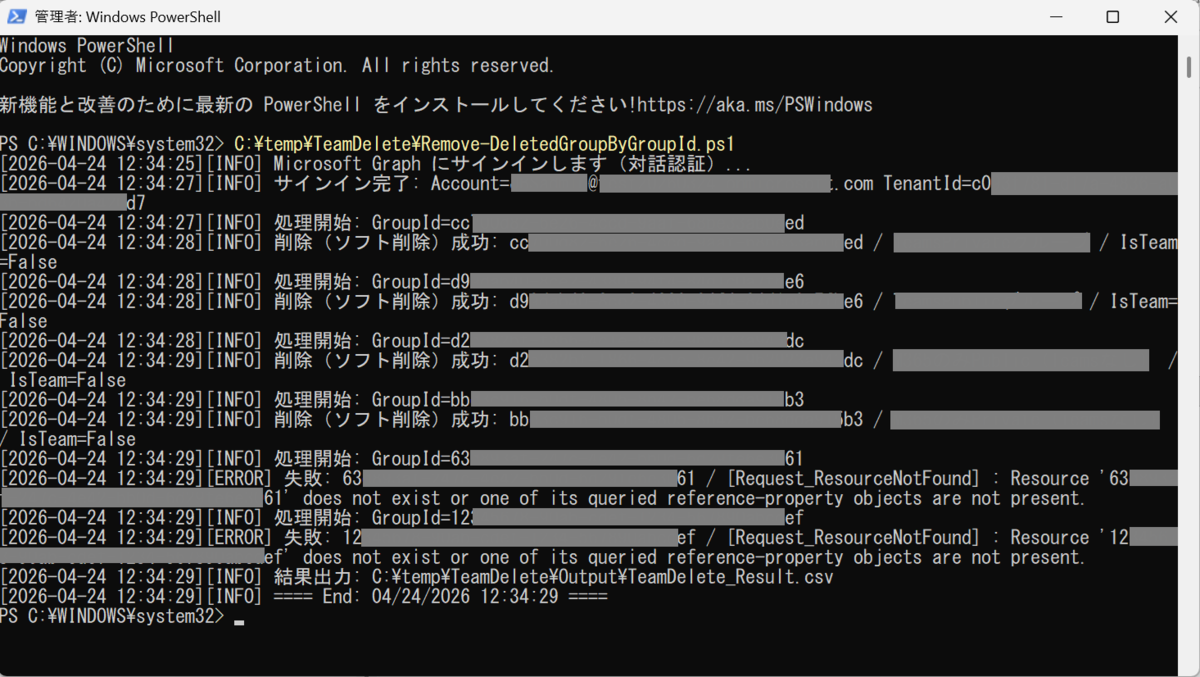
- サインインが求められる場合は、グローバル管理者などの権限を持ったアカウントでサインインします。
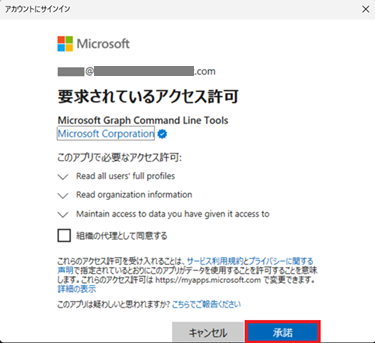
- 管理者アカウントでサインイン後に以下の画面が表示された場合、「承諾」をクリックして進めてください。
結果の確認
$OutputCsvで指定したファイルから、削除結果を参照することが可能です。
正常に削除済に移動できている場合、以下の結果が各列に表示されます。
- 「Action」列が「SoftDelete」になる
- 「Success」列が「TRUE」になる
失敗した場合は「FALSE」となり、「Message」列に理由が表示されます。
出力ファイルの例です。

2~5行目は正常に削除済に移動できている一方、6~7行目はGroupIDに紐づくグループがないため削除失敗したことが確認できます。
おわりに
使用されていないグループやテスト用で不要になったグループをアクティブから削除済グループに移動させるスクリプトを紹介しました。
一つ一つ削除するよりは時間短縮や誤削除の防止につながるのでぜひ活用していただけたら幸いです。
次回は削除済から完全削除するスクリプトを紹介できればと思います。

平林 昌幸(日本ビジネスシステムズ株式会社)
Microsoft 365やセキュリティなど、業務で得た知識や備忘を投稿しています。趣味はスポーツ観戦(主に野球)、旅行、筋トレ、猫の動画を見ること。
担当記事一覧