Microsoft Agent Framework と Microsoft Foundry Agent Service を組み合わせることで、コードで実装した AI Agent を Microsoft 管理基盤上に公開し、他のアプリケーションや別の Agent から再利用できるようになります。
本記事では、Microsoft Agent Framework(MAF)で Skill を持つ Agent を作成し、その Agent を Microsoft Foundry Hosted Agent として公開し、公開済みの Hosted Agent を再び MAF から呼び出す流れを紹介します。
ポイントは、Agent の業務知識や標準手順をプロンプトやコードに直接埋め込むのではなく、Skill として分離することです。Skill は SKILL.md として作成できます。Microsoft Foundry では、Skill をバージョン管理された Skills API に保存したり、Toolbox にアタッチし、MCP client から検出・読み込みする構成も利用できます。
今回はまず再現性を優先し、skills/ 配下の SKILL.md を Agent プロジェクトに含めて読み込む direct injection 方式を扱います。Foundry Skills API と Foundry Toolbox MCP Skills を使う発展構成は、別記事で扱います。
なお、Foundry Skills や Hosted Agent の一部機能は Preview として提供されているため、本番利用時は最新の Microsoft Learn、リージョン対応状況、制限事項、SLA、RBAC、ネットワーク制約を確認してください。
- Microsoft Agent Framework と Microsoft Foundry の役割分担
- 実行環境
- 実装
- 最後に
Microsoft Agent Framework と Microsoft Foundry の役割分担
Microsoft Agent Framework は、Agent、Workflow、Tool、Skill、Middleware などを使って Agentic AI application を実装するためのフレームワークです。Python / .NET で AI agents と multi-agent workflows を構築・オーケストレーション・デプロイするフレームワークとして公開されています。
一方、Microsoft Foundry Hosted Agent は、Agent Framework などで実装した Agent をコンテナー化されたアプリケーションとして Microsoft-managed infrastructure にデプロイするための仕組みです。Hosted Agent では、scaling、session state persistence、security、lifecycle management などを Microsoft Foundry 側に寄せることができます。
| 項目 | Microsoft Agent Framework | Microsoft Foundry / Hosted Agent |
| 主な役割 | Agent / Workflow / Tool / Skill / Middleware の実装 | Agent の公開・実行・運用 |
| Agent 定義 | コード側で管理できる | Foundry 側で service-managed agent として管理できる |
| Skill の扱い | Agent が Skill を読み込んで利用する | Skills API / Toolbox で versioned / reusable に管理できる |
| Tool の扱い | Function Tool / MCP Tool / hosted tools などを利用 | Toolbox MCP endpoint 経由で tools / skills を提供できる |
| 公開方法 | ResponsesHostServer などで protocol endpoint 化 | Hosted Agent として managed endpoint 化 |
| 再利用方法 | 別 Agent / workflow / application から呼び出す | FoundryAgent で service-managed agent として呼び出す |
今回の記事では、MAF は Agent と Skill の実装基盤、Microsoft Foundry は Agent / Skill / Tool の管理・公開・運用基盤として位置付けます。
実行環境
本記事では、以下の環境を前提にします。
- Python:3.13
- Microsoft Agent Framework:agent-framework 1.10.0
- Foundry integration:agent-framework-foundry 1.10.0
- Foundry hosting:agent-framework-foundry-hosting 1.0.0a260630
agent-framework-foundry-hosting==1.0.0a260630 は alpha / preview 系のパッケージとして扱い、Microsoft Learn、PyPI、公式 GitHub の最新情報を確認しながら利用してください。
requirements.txt
本記事では、検証時点の再現性を高めるため、主要ライブラリのバージョンを固定します。
agent-framework-core==1.10.0
agent-framework-foundry==1.10.0
agent-framework-foundry-hosting==1.0.0a260630
azure-identity
実装
今回作成する Agent は、Skill を持つ MAF Agent です。
デモでは、以下の 2 つの Skill を持たせます。
- support-style:回答の文体、構成、注意書きに関するルールを定義する Skill
- escalation-policy:回答できない場合、追加確認が必要な場合、人による確認が必要な場合の判断基準を定義する Skill
この Skill を利用する Agent を作成し、次の流れで公開・再利用します。
- SKILL.md として Skill を作成する
- Skill を Agent プロジェクトに含める
- MAF Agent が Skill を読み込めるようにする
- MAF Agent を Responses protocol で Hosted Agent 化する
- Microsoft Foundry Hosted Agent として deploy する
- 公開済み Hosted Agent を MAF の FoundryAgent から呼び出す
Skill を code や prompt に直接埋め込まず、SKILL.md として分離することで、業務知識や標準手順を再利用可能な部品として扱いやすくなります。
※ Skill を Microsoft Foundry 側でバージョン管理したい場合は、Foundry Skills API を使う構成も選択できます。
Skill を作成する
まず、Agent に持たせる Skill を SKILL.md として作成します。
skills/
  support-style/
    SKILL.md
  escalation-policy/
    SKILL.md
Skill 名は lowercase letters、numbers、hyphens を使う形式にします。name と description は Skill の識別と発見に使います。
以下の以下の SKILL.md は、Use skills with Microsoft Foundry agents (preview) - Microsoft Foundry | Microsoft Learn に記載されている SKILL.md の形式を参考にしています。
skills/support-style/SKILL.md
回答の文体、構成、注意書きに関するルールを定義する Skill です。
---
name: support-style
description: Defines response style, structure, and tone for enterprise support answers.
---

# Support Style Skill

## Purpose

Use this skill when answering enterprise support or technical guidance questions.

## Instructions

- Start with a direct conclusion.
- Use concise Japanese.
- Prefer tables when comparing options.
- Clearly separate facts, recommendations, and cautions.
- Do not expose internal implementation details unless necessary.
- If the answer includes implementation guidance, include assumptions and limitations.
skills/escalation-policy/SKILL.md
回答できない場合、追加確認が必要な場合、人による確認が必要な場合の判断基準を定義する Skill です。
---
name: escalation-policy
description: Defines when and how the agent should escalate or ask for additional information.
---

# Escalation Policy Skill

## Purpose

Use this skill when the user's request cannot be completed safely or accurately with available information.

## Instructions

- If required facts are missing, state what is missing.
- If the request requires access to external systems not available to the agent, explain the limitation.
- If the topic involves security, privacy, compliance, or production risk, recommend human review.
- Do not fabricate unsupported implementation details.
- If the user asks for a production recommendation, clearly distinguish confirmed facts from design suggestions.
Skill を Agent プロジェクトに含める
今回は、 Python サンプルとして、skills/ 配下の SKILL.md を Agent 起動時に読み込み、Agent instructions に追加します。
本記事では、ローカルプロジェクトに Skill を含める方式で実装します。
main.py、skill_loader.py、skills/ を Agent プロジェクトのルートに配置します。
<your-agent-project-name>/
  main.py
  skill_loader.py
  requirements.txt
  azure.yaml
  skills/
    support-style/
      SKILL.md
    escalation-policy/
      SKILL.md
Skill を読み込む Python ユーティリティを作成する
このコードセクションは、SKILL.md を Agent プロジェクトに含める方式を Python で扱うための実装例です。
SKILL.md の形式は Use skills with Microsoft Foundry agents (preview) - Microsoft Foundry | Microsoft Learnを参考にしています。
skill_loader.py
from pathlib import Path


def load_skill_markdown(skill_dir: str) -> str:
    skill_path = Path(skill_dir) / "SKILL.md"

    if not skill_path.exists():
        raise FileNotFoundError(f"SKILL.md was not found: {skill_path}")

    return skill_path.read_text(encoding="utf-8")


def load_all_skills() -> str:
    skill_paths = [
        "skills/support-style",
        "skills/escalation-policy",
    ]

    skill_bodies = []

    for path in skill_paths:
        skill_bodies.append(load_skill_markdown(path))

    return "\n\n---\n\n".join(skill_bodies)
この実装では、skills/support-style/SKILL.md と skills/escalation-policy/SKILL.md を読み込み、Agent の instructions に追加できる文字列として結合します。
MAF Agent を実装する
次に、MAF Agent 本体を実装します。
このコードセクションは、Foundry Hosted Agents | Microsoft Learnの Python サンプルを参考にしています。FoundryChatClient、Agent、ResponsesHostServer を使って、Agent を Foundry Responses protocol で公開します。
main.py
import os

from azure.identity import DefaultAzureCredential
from agent_framework import Agent
from agent_framework.foundry import FoundryChatClient
from agent_framework_foundry_hosting import ResponsesHostServer

from skill_loader import load_all_skills


skill_instructions = load_all_skills()

base_instructions = """
You are an enterprise support assistant.
Use the provided skills when they are relevant.
Answer clearly, safely, and concisely.
"""

client = FoundryChatClient(
    project_endpoint=os.environ["FOUNDRY_PROJECT_ENDPOINT"],
    model=os.environ["AZURE_AI_MODEL_DEPLOYMENT_NAME"],
    credential=DefaultAzureCredential(),
)

agent = Agent(
    client=client,
    name="<your-agent-name>",
    instructions=f"{base_instructions}\n\n# Available Skills\n\n{skill_instructions}",
    default_options={
        "store": False,
    },
)

server = ResponsesHostServer(agent)
server.run()
ResponsesHostServer は、Agent を Foundry Responses protocol 経由で公開するために利用します。store=False は、hosting infrastructure 側の conversation history 管理と重複しないようにするための設定です。
この実装により、Agent は support-style と escalation-policy の Skill を instructions として持つ Hosted Agent になります。
azure.yaml を作成する
azure.yaml は、Azure Developer CLI が Agent プロジェクトを認識し、ローカル実行、provision、deploy を行うためのプロジェクト構成ファイルです。
Microsoft Foundry Hosted Agent の構成では、azure.yaml に Foundry project、model deployment、agent service、起動コマンドなどの構成を定義します。
azure.yaml は、azd ai agent init で Hosted Agent project を初期化すると生成されます。azd ai agent init は、Microsoft Foundry に AI agent を build / test / deploy するために必要なファイルを作成します。
cd <maf-skill-hosted-demo>
azd ai agent init
対話式のウィザードでは、以下のように選択します。
How do you want to initialize your agent?
  > Use the code in the current directory

What is the name of your project?
  > <your-agent-project-name>

Enter a name for your agent
  > <your-agent-name>

How would you like to deploy your agent?
  > Source Code (ZIP upload)

Select the runtime for your agent
  > Python 3.13

Enter the file path for the entry point of the agent
  > main.py

How should dependencies be resolved?
  > Remote build (dependencies installed on server during deployment)

Which protocols does your agent support?
  > responses

Select a Foundry project to host your agent and any models or tools it uses
  > Use an existing Foundry project

How would you like to configure model(s) for your agent?
  > Use an existing model deployment

Select a model deployment
  > <your-model-deployment-name>
ローカルで Hosted Agent と同じ形で実行する
ローカルでは、Azure Developer CLI(AZD)を使って Agent Host を起動します。
このコードセクションは、ファウンドリホストエージェント | Microsoft Learn を参考にしています。
まず、AZD の Microsoft Foundry extension をインストールします。
azd ext install microsoft.foundry
次に、Agent Host をローカルで実行します。azure.yaml がある Agent プロジェクトのルートディレクトリで実行します。
azd ai agent run
ローカル起動後、別ターミナルから /responses endpoint を呼び出します。
azd ai agent invoke --local "このエージェントが利用できるスキルに従って、回答スタイルを説明してください。"
curl などで実行する方法もありますが本記事では割愛します。
詳しくは ファウンドリホストエージェント | Microsoft Learn をご覧ください。
実行結果は次のようになります。
Target:       localhost:8088 (local)
Message:      "このエージェントが利用できるスキルに従って、回答スタイルを説明してください。"
Session:      fbf1859b-d6f4-44ae-9f2a-4f3758748ac5
Conversation: 55bc2aa8-ff0a-4fc4-a62e-af2ee95bc3ae

[local] このエージェントの回答スタイルは、**「結論先出し・簡潔・実務向け」**です。

## 基本方針
- **最初に結論を述べる**
- **日本語で簡潔に回答する**
- **比較が必要な場合は表を使う**
- **事実、推奨、注意点を分けて書く**
- **内部実装の詳細は、必要な場合のみ説明する**

## 重要な扱い
- **前提条件や制限がある場合は明記する**
- **必要な情報が不足している場合は、その不足点を伝える**
- **外部システムへのアクセスが必要な内容は、できないことを明示する**
- **セキュリティ、プライバシー、コンプライアンス、本番影響がある内容は、人による確認を勧める**

## 文章のイメージ
- 悪い例: 長い前置き、曖昧な表現、結論が最後
- 良い例:
  - 結論
  - 理由
  - 必要なら注意点
  - 必要なら次のアクション

必要であれば、**このスタイルを使った回答テンプレート**も作れます。
また、http://127.0.0.1:8087/ を開くと以下のように確認ができます。

この段階で、Hosted Agent として deploy する前に、Responses protocol と Agent の基本動作を確認します。
Microsoft Foundry Hosted Agent として deploy する
ローカルで動作確認できたら、Microsoft Foundry Hosted Agent として公開します。
このコードセクションは、Deploy a hosted agent - Microsoft Foundry | Microsoft Learn と Quickstart: Deploy your own code as a hosted agent - Microsoft Foundry | Microsoft Learn を参考にしています。
Hosted Agent の deployment lifecycle は、Container Image deployment を選択した場合は、agent code を container image として package し、Azure Container Registry に push、Foundry Agent Service に agent version を登録、active な version を invoke する流れになります。
初回は、リソース作成と deploy を分けて実行できます。
azd provision
azd deploy
provision と deploy をまとめて実行する場合は以下を使います。
azd up
デプロイが成功すると、Microsoft Foundry からエージェントを確認可能です。
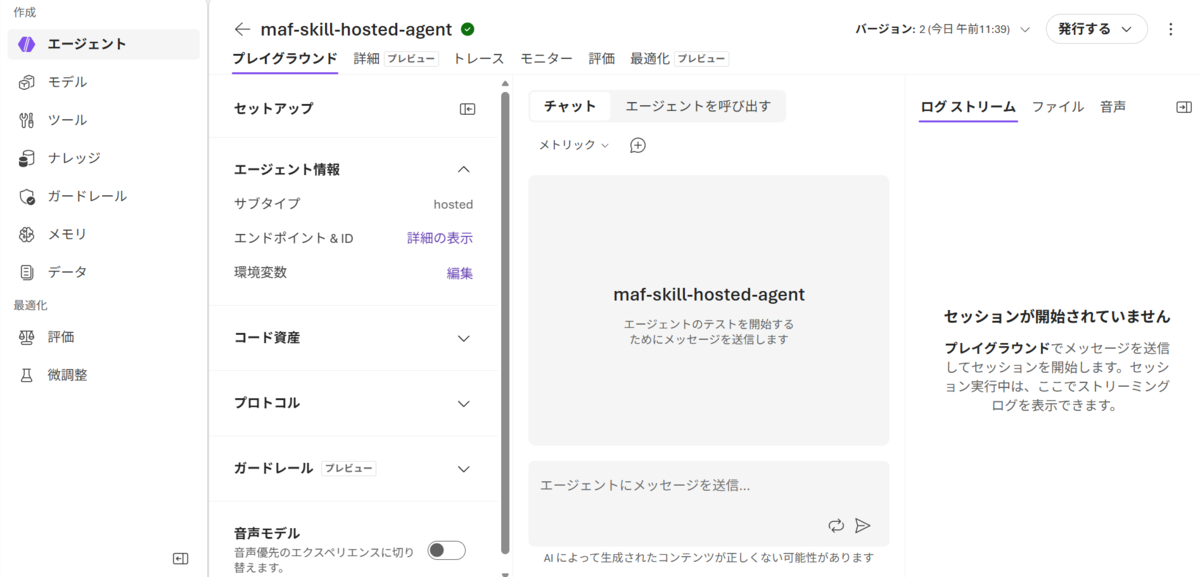
Hosted Agent としてデプロイされると、Agent は Foundry project の dedicated endpoint から呼び出せます。Hosted Agent では、dedicated Microsoft Entra ID、dedicated endpoint、session state persistence、observability などを利用できます。
公開済み Hosted Agent を MAF から呼び出す
公開済み Hosted Agent は、別の MAF アプリケーションから FoundryAgent として呼び出します。
このコードセクションは、Microsoft Foundry | Microsoft Learn を参考にしています。
FoundryAgent は、Foundry Agent Service に作成済みの Prompt Agent / Hosted Agent に接続するための API です。
import os
import asyncio

from azure.identity.aio import DefaultAzureCredential
from agent_framework.foundry import FoundryAgent


async def main() -> None:
    credential = DefaultAzureCredential()

    agent = FoundryAgent(
        project_endpoint=os.environ["FOUNDRY_PROJECT_ENDPOINT"],
        agent_name=os.environ["FOUNDRY_HOSTED_AGENT_NAME"],
        credential=credential,
        allow_preview=True,
    )

    response = await agent.run(
        "あなたが利用できるスキルに従って、回答スタイルとエスカレーション方針を説明してください。"
    )

    print(response)


if __name__ == "__main__":
    asyncio.run(main())
ここで重要なのは、FoundryAgent 側で新しい Skill を追加しているわけではない点です。FoundryAgent は、すでに Microsoft Foundry Hosted Agent として公開されている Agent を呼び出します。
FoundryAgent では、Agent definition、instructions、tool configuration は Foundry 側の Agent 定義が正になります。dynamic tool selection や skill loading を呼び出し側で行いたい場合は、model loop をアプリ側が所有する Agent(client=FoundryChatClient(...)) の構成を検討します。
実行すると以下のような結果になります。
承知しました。**この対応では「support-style」と「escalation-policy」に従います。**

## 回答スタイル(support-style)
- **結論を先に**述べます。
- **簡潔な日本語**で回答します。
- 比較が必要な場合は、**表を優先**します。
- 内容は **事実 / 推奨 / 注意点** を分けて整理します。
- 内部実装の詳細は、**必要な場合のみ**説明します。
- 実装案を含む場合は、**前提条件と制約**も併記します。

## エスカレーション方針(escalation-policy)
- 必要な情報が足りない場合は、**不足している項目を明示**して確認します。
- 外部システムへのアクセスが必要で、こちらでできない場合は、**できない理由を説明**します。
- **セキュリティ、プライバシー、コンプライアンス、本番環境のリスク**がある場合は、**人の確認を推奨**します。
- 不確かな実装詳細は、**推測で断定しません**。
- 本番向けの判断が必要な場合は、**確認済みの事実**と**設計上の提案**を分けて説明します。

必要であれば、次に「この方針に沿った回答例」もお見せできます。
設計上の注意点
Skill は Hosted Agent 側に持たせる
今回のデモでは、Skill は Hosted Agent の能力として構成します。
Hosted Agent
  └─ Skill を持つ

Calling App
  └─ FoundryAgent で Hosted Agent を呼ぶ
FoundryAgent は Foundry 側に定義済みの service-managed agent を呼び出すための API です。呼び出し側で Skill や Tool を後付けする構成ではなく、Hosted Agent 側に Skill / Tool 構成を含めます。
Skill と Tool を分けて設計する
Skill と Tool は役割が異なります。
| 項目 | 役割 |
| Skill | 業務知識、標準手順、回答ルール、判断基準 |
| Tool | API 呼び出し、検索、Code Interpreter、MCP server、Azure AI Search などの実行機能 |
Skill は SKILL.md として作成し、Agent の context に入る行動指針として扱います。Tool は実際に外部 API や検索、処理を実行する機能です。
Agent identity / RBAC を確認する
Hosted Agent は deploy 時に dedicated Microsoft Entra ID を持ちます。この Agent identity は、実行時のモデル呼び出し、ツールアクセス、下流の Azure サービスへのアクセスで利用します。
外部 Azure Storage など、Foundry project の default access 以外の resource にアクセスする場合は、Agent の Microsoft Entra ID に必要な RBAC role を付与します。
Observability を確認する
Hosted Agent では、Application Insights と OpenTelemetry による observability が重要です。
Hosted Agent platform は Application Insights connection string を agent container に環境変数として注入できます。protocol libraries を使う Agent は OpenTelemetry traces を出力できます。
確認ポイントは以下です。
- ローカルで /responses が応答する
- Microsoft Foundry portal で Hosted Agent が確認できる
- MAF の FoundryAgent から公開済み Agent を呼び出せる
- Application Insights で request / dependency / trace を確認できる
最後に
本記事では、Microsoft Agent Framework で Skill を持つ Agent を作成し、Microsoft Foundry Hosted Agent として公開し、公開済みの Agent を MAF から再利用する構成を紹介しました。今回の構成のポイントは、次の 3 点です。
- Skill を code や prompt から分離する
- 業務知識、回答ルール、標準手順を SKILL.md として分離し、再利用可能な部品として扱います。
- MAF Agent を Hosted Agent として公開する
- Agent のロジックは MAF で実装し、公開・実行・運用は Microsoft Foundry Hosted Agent に寄せます。
- 公開済み Agent を MAF の FoundryAgent から再利用する
- 別アプリケーションや別 Agent から、公開済み Hosted Agent を service-managed agent として呼び出します。
MAF と Microsoft Foundry は競合するものではなく、MAF は Agent / Skill の実装基盤、Microsoft Foundry は Agent の管理・公開・運用基盤として組み合わせることで、コード中心の開発体験と managed agent 運用を両立できます。